Snipebot, Stalkbot, Auto Veto и синхронизация в облаке Snipebot, Stalkbot, Auto Veto and cloud sync
Приложение для Windows поверх unmatched.gg: очередь поимённо, соперники до принятия матча, настройки и списки в облаке. A Windows app that sits on top of unmatched.gg: the queue by name, the other team before you accept, settings and lists in the cloud.
Отдельный клиент unmatched.observer + интеграция с Telegram. A standalone unmatched.observer client, plus Telegram.
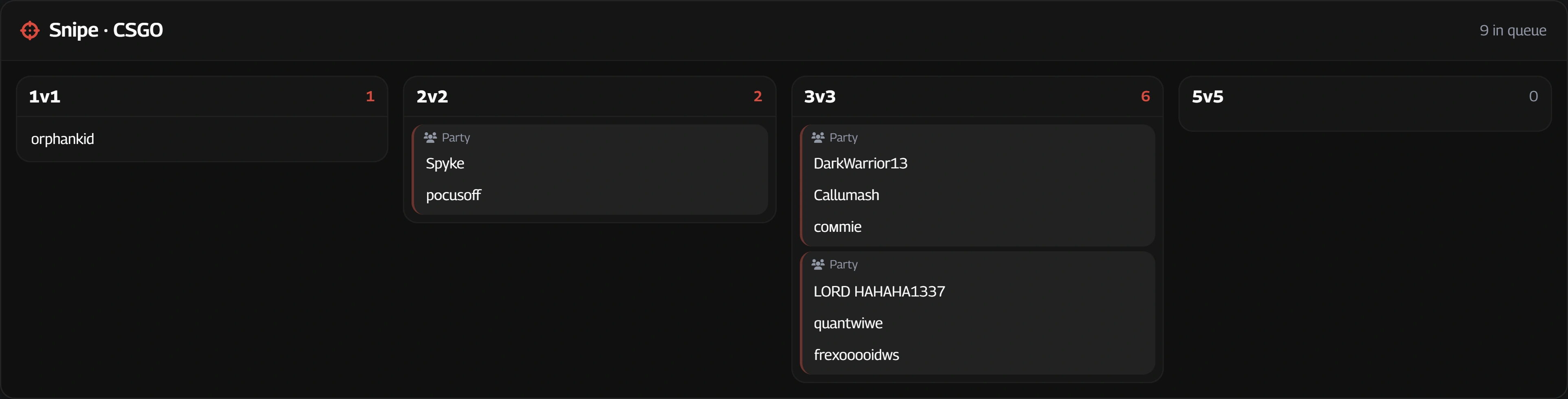
Просмотр игроков до принятия матча See the players before you accept
Панель разворачивает соперников: K/D, MMR, ранг и уровень по каждому режиму, сыгранные матчи и винрейт, три лучшие карты с процентом побед. The panel opens up the other team: K/D, MMR, rank and level per mode, matches played and win rate, and their three best maps with the win rate on each.
Состав подтягивается по мере того, как становится известен: иногда весь сразу, иногда по одному. The roster fills in as it becomes known: sometimes all at once, sometimes one at a time.
Dynamic Maps Veto Dynamic Maps Veto
Порядок банов вы задаёте один раз — перетаскиванием, свой на каждую игру и каждый режим, и его можно скопировать из одного режима в другой. Дальше вето идёт само, и вы в него не возвращаетесь. You set the ban order once, by dragging — your own for each game and each mode, and it can be copied from one mode into another. After that the veto runs itself and you never go back to it.
Список поделён на тройки. Какую из трёх банить первой, решает не порядок, а соперник: берётся та, на которой у той стороны лучший процент побед — среднее по их составу, взвешенное по числу сыгранных матчей, и записи меньше пяти матчей не считаются. Вы говорите, какие карты вам не нравятся; статистика выбирает между ними. The list is grouped in threes. Which of the three goes first is decided by the other team rather than by the order: it takes the map they win on most — averaged across their side, weighted by matches played, and records under five matches ignored. You say which maps you dislike; the statistics choose between them.
Пауза перед баном растёт по мере того, как пустеет доска: почти ничего, пока карт тринадцать и никому не важно, какая уйдёт первой, и самая долгая на последнем свободном выборе — там, где кольцо на плитке и есть ваше окно, чтобы передумать и забанить другую руками. Оба конца задаются одним ползунком. Можно остановиться после любого бана и доиграть вето самому. The pause before a ban grows as the board empties: almost nothing while thirteen maps are up and nobody minds which goes first, and its longest at the last free choice — where the ring filling on the tile is your window to change your mind and ban another one by hand. One slider sets both ends. You can stop after any ban and play the rest of the veto yourself.
Без статистики — новый аккаунт, приватный, ответ не успел прийти — берётся ваш порядок как написан. Ждать сети, чтобы нажать кнопку, оно не станет. With no statistics — a new account, a private one, an answer that has not arrived — it falls back to the order you wrote. It never waits for the network to press a button.
Stalkbot Stalkbot
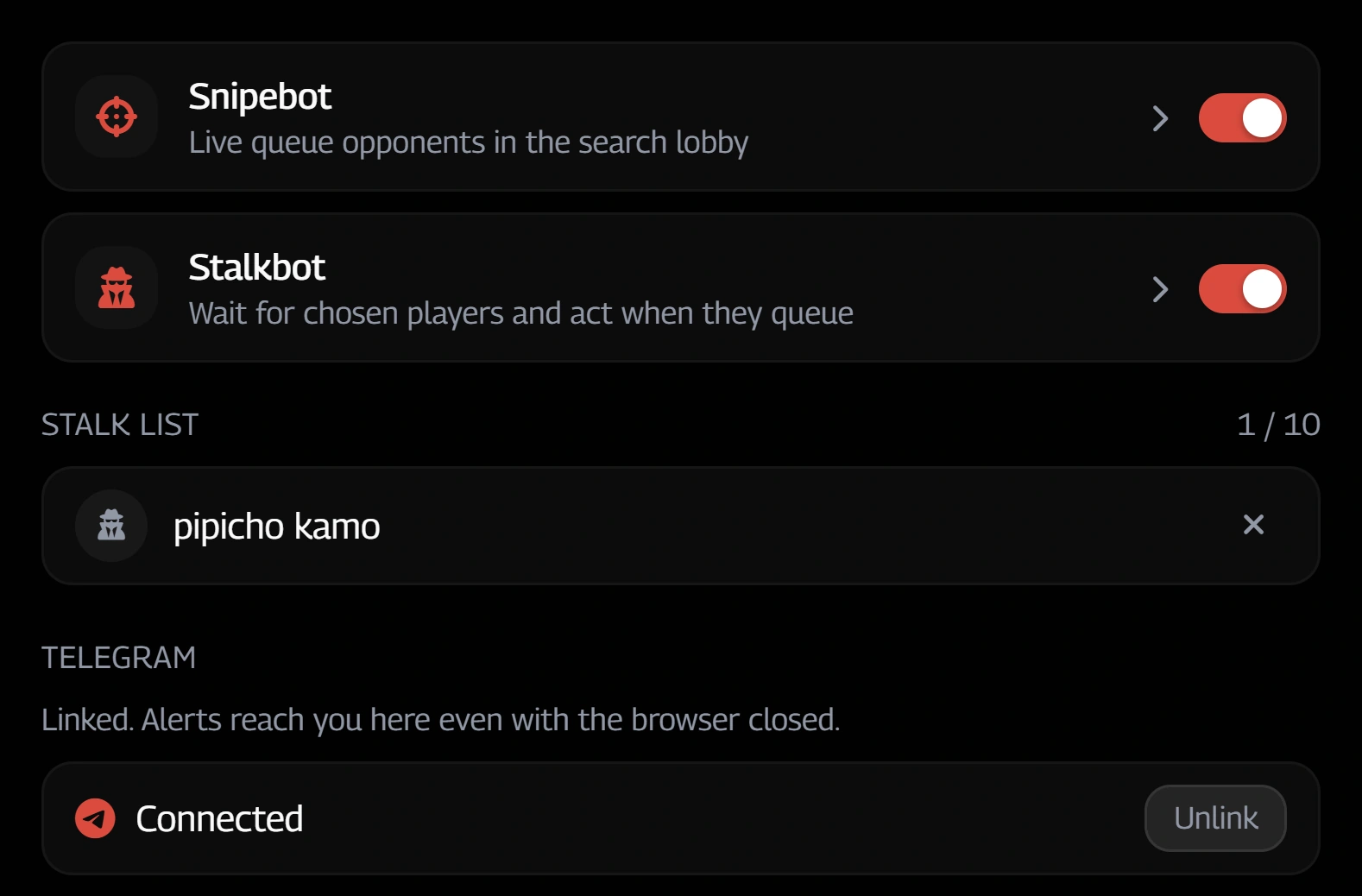
Отметьте игрока — и когда он встанет в очередь, вам об этом скажут. Уведомление на экране, сообщение в Telegram — и оно приходит с закрытым браузером, потому что очередь просматривает сервер, а не ваша вкладка. Если игрок встал в тот же режим, который выбран у вас, поиск запустится сам: пять секунд на отмену. Mark a player, and when they start queueing you are told. A notice on screen, a message in Telegram — and that one arrives with the browser closed, because the queue is swept by the server and not by your tab. If they queue into the mode you already have picked, your own search starts itself: five seconds to cancel.
Отметить можно с профиля игрока или прямо с карточки, которая открывается по наведению на ник. Telegram привязывается один раз, кнопкой в настройках. You can mark somebody from their profile, or straight from the card that opens when you hover their name. Telegram is linked once, with a button in the settings.
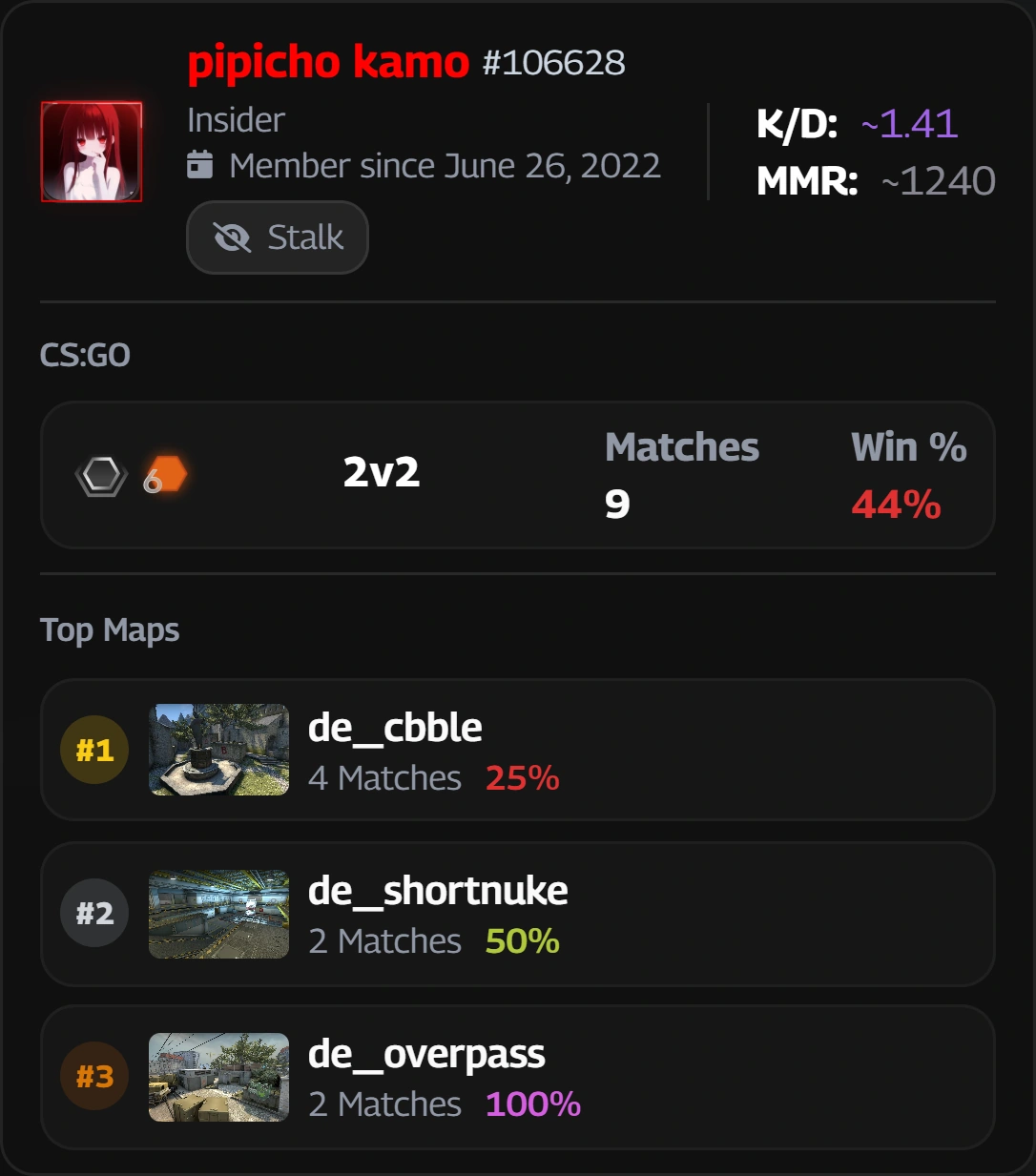
Ник — и сразу всё о нём A name, and everything behind it
Наведите на любой ник где угодно на сайте — карточка откроется на месте. K/D, MMR, матчи и винрейт по каждому режиму, три лучшие карты с процентом побед на каждой. Винрейт, хедшоты и K/D раскрашены по опасности, так что состав читается взглядом, а не по числу за раз. Hover any nickname anywhere on the site and the card opens in place. K/D, MMR, matches and win rate per mode, their three best maps with the win rate on each. Win rate, headshots and K/D are coloured by how dangerous they are, so you read a roster at a glance instead of one number at a time.
Оттуда же — кнопка «Stalk»: игрок отправляется в список слежки одним нажатием, не открывая его профиль. Наведение на матч работает так же и показывает карту, счёт и обе команды. The Stalk button is right there too: one press puts them on the stalk list without opening their profile. Hovering a match works the same way and shows the map, the score and both teams.
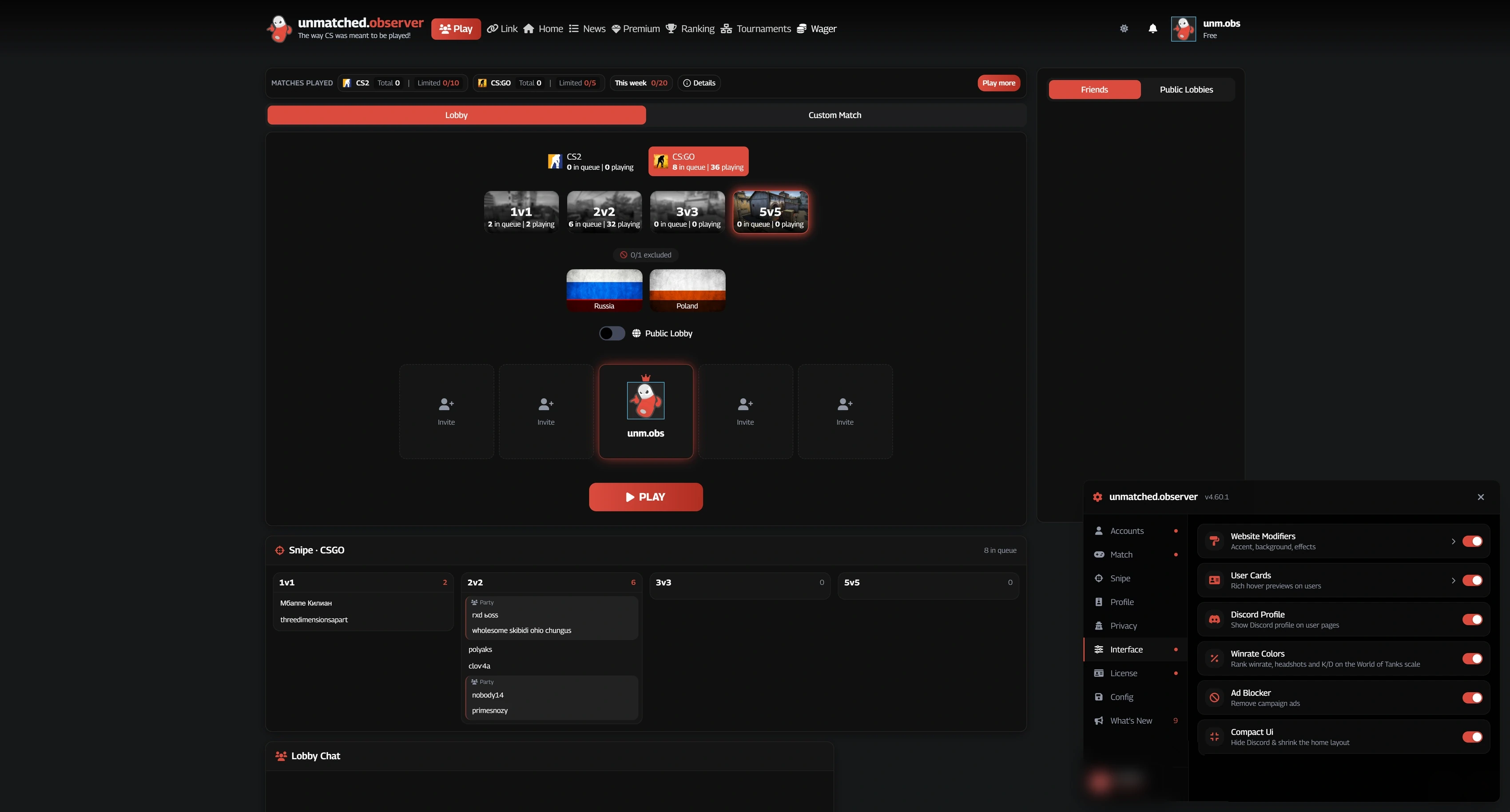
Свой цвет и свои обои Your own colours, your own wallpapers
Цвета интерфейса настраиваются, обои можно загрузить свои. The interface colours are yours to set, and the wallpapers can be your own.
Полный список функций The full list of features
В матчеIn a match
- Автоматическое принятие матча.Automatically accept matches.
- Автоматический выбор сервера: Германия, Польша или Россия.Automatically vote for Germany, Poland or Russia.
- Dynamic Maps Veto: порядок банов для каждого режима. В каждой тройке первой исключается сильнейшая карта соперников.Dynamic Maps Veto: set a ban order per mode. Within each group of three, the opponents’ strongest map is banned first.
- Следующий автобан отмечен на доске таймером. До его окончания можно выбрать другую карту вручную.A countdown marks the next automatic ban. You can ban a different map before it finishes.
- Настраиваемая задержка между банами. Автобан можно остановить на выбранном шаге.Adjust the delay between bans and stop automatic veto at a chosen step.
- Snipebot: список игроков в очереди под лобби или во всплывающем меню.Snipebot: see queued players below the lobby or in a hover menu.
- Уведомления Telegram о найденном матче с составом и ссылками на профили. Включаются отдельно.Optional Telegram match-found alerts with the roster and profile links.
- Строка подключения оказывается в буфере, как только появилась.The connect string lands on your clipboard the moment it appears.
- Звук найденного матча: восемь готовых вариантов или свой файл, с настройкой громкости.Match-found sound: eight presets or your own file, with volume control.
- Таймер под кнопкой очереди: видно, за сколько нашлась игра.A timer under the queue button, so you can see how long the game took to find.
ЛюдиPeople
- Карточка по наведению на любой ник: K/D, MMR, матчи и винрейт по режимам, три лучшие карты.A card on hovering any nickname: K/D, MMR, matches and win rate per mode, three best maps.
- Винрейт, хедшоты и K/D раскрашены по опасности — состав читается взглядом.Win rate, headshots and K/D are coloured by how dangerous they are, so a roster reads at a glance.
- Наведение на любой матч где угодно на сайте показывает карту, счёт и обе команды.Hovering any match anywhere on the site shows the map, the score and both teams.
- Stalkbot: отметьте тех, кто вам интересен, и узнаете в ту же секунду, как один из них встал в очередь — на экране и в Telegram, даже если браузер закрыт. По желанию сам начнёт поиск, дав пять секунд на отмену.Stalkbot: mark the players you care about and hear the moment one of them queues — on screen and in Telegram, with the browser shut. It can start your search for you, with five seconds to call it off.
- Личные заметки на профилях игроков с синхронизацией между вашими устройствами.Private player notes, synced across your devices.
- Метка на профиле и на карточках Match Found у аккаунтов, которых называли чьей-то второй учёткой. По наведению — как именно называли, и ничего сверх этого. Серая, если не называл никто.A mark on profiles, and on the cards in Match Found, for accounts people have named as somebody’s second. Hover it for what they were called, and nothing beyond that. Grey when nobody has.
- Discord игрока виден прямо на его странице.A player’s Discord shows on their profile page.
- Метка Observer рядом с никами пользователей приложения.An Observer mark beside other app users’ names.
- Чужие профили можно смотреть, не попадая в счётчик просмотров.Profiles can be viewed without turning up in the view counter.
- Невидимки видны онлайн.Players hiding as offline show up as online.
- Приватный режим прячет профиль из списка, гостевой книги, истории ников и общей статистики — и держит эти галки закрытыми.Private mode hides your profile from the list, the guestbook, the name history and the public stats, and holds those boxes shut.
ОформлениеAppearance
- Акцент, цвет границ и цвет интерфейса — перекрашивается весь сайт, панели и границы вместе с ним.The accent, the border colour and the interface colour: the whole site repaints, panels and borders with it.
- Светлая тема с переключателем прямо в шапке сайта. Свой цвет при этом сохраняется и возвращается.A light theme with its switch in the site header. Your own colour is kept and comes back.
- Свои обои: тонировка, размытие, параллакс. Или анимированные, с курсорными эффектами.Your own wallpapers, with tint, blur and parallax. Or animated ones, with cursor effects.
- Анимация поиска — своя вместо сайтовой.The search animation, yours instead of the site’s.
- Свой бейдж, роль, рамка аватара и цвета ролей.Your own badge, role, avatar border and role colours.
- Рекламные баннеры убраны, главная сжата.The site’s campaign banners are removed and the home page is tightened up.
В облакеIn the cloud
- Синхронизация настроек между устройствами.Settings sync across your devices.
- Список слежки, лицензия и сохранённые аккаунты — там же.The stalk list, the licence and your saved accounts are there too.
- Загруженные обои и звуки лежат на сервере, а не на диске.Uploaded wallpapers and sounds live on the server rather than on a disk.
- В кабинете доступны сохранённые настройки и аккаунты unmatched.gg.View saved settings and unmatched.gg accounts in your account page.
- Передача настроек по одноразовой ссылке с уведомлением в Telegram об импорте.Share settings with a one-time link and receive a Telegram notification when they are imported.
Вокруг приложенияAround the app
- Сохранённые аккаунты: переключение в два клика, на каждом видно уровень, винстрик, баны и дату регистрации.Saved accounts: two clicks to switch, each showing level, win streak, bans and join date.
- Создание нового аккаунта с предварительным сохранением текущей сессии.Create a new account after saving your current session.
- Режим стримера: в менеджере аккаунтов ники становятся Hidden Player, и аватары уходят вместе с ними.Streamer mode: names in the account manager become Hidden Player, and the avatars go with them.
- Ctrl+C на любой странице сайта копирует её адрес, Ctrl+V — переводит на адрес из буфера. Оба отступают, как только что-то выделено или курсор в поле ввода.Ctrl+C anywhere on the site copies the address of the page, and Ctrl+V takes you to the one in your clipboard. Both stand down the moment something is selected or a text box has the cursor.
- Отрисовка приостанавливается, пока окно приложения неактивно. Оповещения и очередь продолжают работать.Rendering pauses while the app window is inactive. Alerts and the queue feed keep working.
- Год ваших матчей в кабинете, по дням и режимам, со всех аккаунтов unmatched.gg сразу.A year of your matches in your account, day by day and by mode, across every unmatched.gg account you play on.
- Устройства и свободные слоты лицензии в кабинете.View devices and available licence slots in your account.
- Обращения в поддержку и скриншоты — в кабинете.Support conversations and screenshots in your account.
- Вход через Discord, Telegram или ключ доступа.Sign in with Discord, Telegram or a passkey.
- Автоматическое обновление функций при запуске и проверка новой версии приложения.Features update on launch. The app checks for new versions.
- «Что нового» с отметкой непрочитанного — прямо в приложении.What’s New, with an unread mark, inside the app.
Из последних обновлений Recent changes
Целиком журнал лежит в приложении и в кабинете. The whole log lives in the app and in your account.
Device verification is available in License settings in the updated desktop app.
Fixed update status messages.
Shorter labels and fewer repeated messages in account and notification screens.
Saved accounts show when sign-in details aren't saved on this device. Update notices say when to restart.
The observer logo follows your interface accent, including in app windows.
Saved accounts show sync progress, errors and retry options without a page reload.
Сколько стоит What it costs
Строгая привязка к устройству: одна лицензия — один компьютер, и слот освобождает поддержка, а не кнопка. Регистрация закрыта: внутрь пускает код приглашения, он же открывает три дня полного доступа. Это единственный пробный период, бесплатного тарифа нет. Только Windows; файл пока не подписан, поэтому первый запуск встречает предупреждением — SHA-256 лежит рядом с загрузкой. The licence is tied hard to one machine: one computer per licence, and the slot is freed by support rather than by a button. Registration is closed — an invite code is the way in, and spending one opens three days of full access. That is the only trial; there is no free tier. Windows only; the file is not signed yet, so the first launch brings up a warning — the SHA-256 sits beside the download.
Вход через Discord, Telegram или ключ доступа. Скачивание — в кабинете, после оплаты. Sign in with Discord, Telegram or a passkey. The download is in your account, after payment.
Код приглашения открывает регистрацию и три дня доступа. После первой оплаты любого тарифа неделя добавляется приглашённому и пригласившему. An invite code opens registration and three days of access. After a first payment on any plan, a week is added to the invited licence and to yours.